
🔥 Limited Time – Save upto 50% on UpsellWP.

Increase Your Order Value With Smart Upsells

Personalize product recommendations, customize upsell offers, increase AOV, and boost sales with our all-in-one WooCommerce Upsell plugin.

Growth analytics

Order Bump Vs Upsell: What is the Difference?

Increasing the average order value gets easier the moment you show the right offer at the right point in checkout. Order bumps and upsells both do this, and both raise revenue from customers you have already earned, but they work in different ways and at different moments.

If you run an online store, the real question is not “which is better?” It is “which one fits this offer, and when should I show it?” Get that wrong and you either leave money on the table or add friction that costs you the sale. In this guide, we cover:

  • What order bumps and upsells actually are
  • Order bump vs upsell: the difference, with real conversion data
  • A simple framework to decide which to use for any offer
  • How to price and set up each one
  • Industry and real brand examples

Let’s get started.

What is an Order Bump?

Order bumps are additional offers displayed to customers at their checkout and encourage them to add more to their cart. For instance, if a customer is purchasing a laptop, an order bump might suggest adding a laptop sleeve or mouse at a discounted price.

It’s a gentle suggestion made to increase your average order value without overwhelming the customer. The customer accepts it with a single click on a checkbox, right before they pay, so there is no extra page and no separate decision to slow them down.

Keeping the product suggestion relevant is the crucial element in order bumps to make it feel like an added value to the customer’s primary purchase.

To study more about order bumps, check out this list of best order bump plugins for WooCommerce .

What is an Upsell?

Upselling is an effective sales strategy where you encourage customers to purchase a high-cost or premium version of the product they’re currently viewing. For instance, if a customer is buying a laptop, an upsell might offer a higher value or the latest version of the product.

It’s all about convincing customers to spend more on something better, with added value, features, quality, and benefits. Upselling works best only when the additional value is clear and compelling, making customers believe they’re getting a better deal by spending a little more.

Because the price is higher, an upsell usually needs a little more convincing than an order bump, which is why it often gets its own space, such as a cart offer, a post-purchase page, or a popup.

Note: Cross-selling is another strategy where you sell related products based on their current purchase. Check out this guide to learn the difference between upselling vs cross-selling .

Related Guide: Here’s the curated list of the best WooCommerce upsell plugins and cross-sell plugins for WooCommerce .

Order Bump Vs Upsell: The Difference

FeatureOrder BumpsUpsells
PlacementDisplayed during checkout, alongside the cart and payment form.Shown before, during, or after purchase, such as shop/product/thank you pages.
PurposeFocuses on smaller product add-ons that complement primary purchase.Aims to encourage customers to purchase more expensive products.
Price RangeTypically low-priced items are suggested.Higher-priced options are suggested
RelevanceHighly related to the primary purchase.May or may not be directly related but adds value to the first purchase.
Customer CommitmentRequires minimal decision-making due to low cost.Required more thought as it involved spending more.
Impact on AOVProvides a moderate boost in average order value.Significantly increase the average order value.
Best Use CaseIdeal for adding complementary or necessary items.Works best for offering premium upgrades.

The simplest way to remember it: an order bump is a pre-checkout offer the customer accepts before paying, while an upsell is usually a higher-value offer shown in the cart or after the initial purchase is secured.

Order Bump Vs Upsell: The Data (Take Rates & AOV Impact)

Definitions are useful, but numbers tell you where to spend your effort. Here is what the data shows about how each performs.

Order bumps convert surprisingly well. Because they are low-cost, relevant, and take one click, a large share of customers accept them. Funnel data from Data Driven Marketing found that anywhere from 20% to 60% of customers act on a well-structured order bump, with the average cart-value increase landing near 15%. That consistency is why order bumps are often the fastest win when optimizing a checkout.

Upsells convert less often, but each acceptance is worth more. The same data set puts upsell take rates closer to 10% to 20% for digital products, with physical goods usually lower. The payoff is size: because upsells offer premium or higher-priced items, merchants commonly see around a 20% lift in average order value from upsells, even at the lower acceptance rate.

Both matter because the base numbers are small. The average eCommerce conversion rate sits at roughly 2.5% to 3%, so every extra dollar from a customer who already decided to buy is efficient revenue you do not have to pay again to acquire. And order bumps specifically help offset lost carts, which matter given that a large majority of eCommerce carts are abandoned before purchase.

The takeaway from the data is not “pick the winner.” It is that order bumps give you frequent, small, reliable wins, and upsells give you rarer, larger wins, so most stores that maximize AOV run both.

Order Bump Vs Upsell: Which Should You Use? (Decision Framework)

You do not have to choose one forever. You choose per offer. Run any product you are thinking of promoting through this quick test:

  • Is it low-cost, relevant, and an easy “yes”? → Make it an order bump at checkout. Think a phone case with a phone, socks with shoes, or a workbook with a course.
  • Is it higher-priced and does it need a little convincing? → Make it an upsell, shown in the cart or as a one-click post-purchase offer where you have room to explain the value. Think a premium version, a bigger bundle, or an upgraded model.
  • Would adding it at checkout slow the customer down or make them second-guess the purchase? → Keep it out of checkout. Move it to a post-purchase upsell so the original order is already secured before you ask.

A helpful rule of thumb: if the offer needs more than a sentence or two to justify, it is probably an upsell, not a bump. Order bumps work because they need almost no explanation.

Order Bump Vs Upsell: Industry-wise Examples

Here are the industry-wise examples of order bumps and upsells.

IndustryOrder BumpsUpsells
FashionAdd a pair of socks or belt at checkout when a pair of pants is purchased.Upgrade to a premium version of the clothing item.
ElectronicsAdd a screen protector or charging cable.Upgrade to a higher store capacity device.
Food & BeverageAdd a chocolate or cookie at the checkout.Upgrade to an assorted winter chocolate box.
FitnessAdd a resistance band.Upgrade to complete gym equipment.
Beauty & SkincareAdd a travel-sized product.Upgrade to a premium skincare kit.
Software/SaaSOffer support for a small amount.Upgrade to the pro version with advanced features.

Order Bump Vs Upsell: Brand Examples

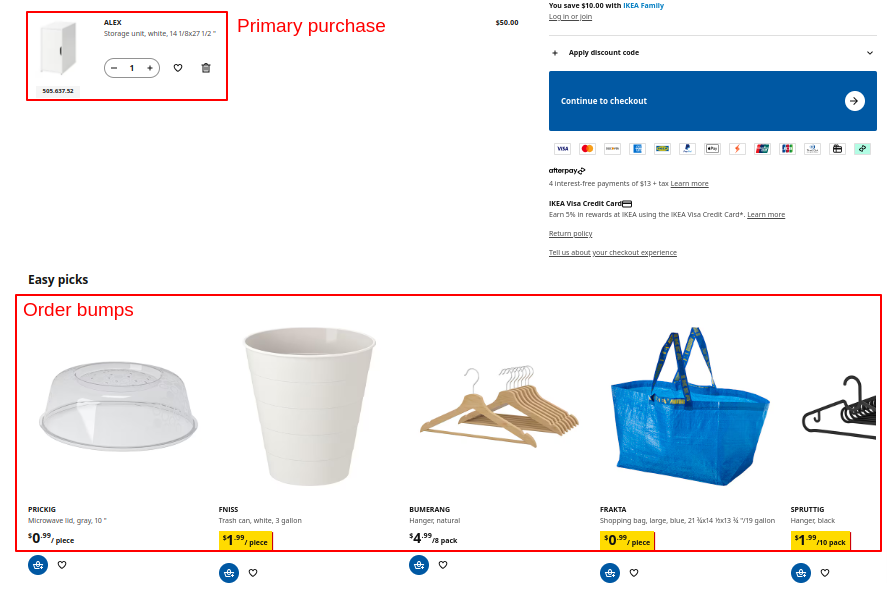
Ikea uses order bumps to the maximum by showing related products at checkout. Here, for a ‘storage unit’, they recommended a microwave lid, trash can, and more.

Brand example for order bumps

Here’s how it works:

  • These order bumps are low-cost so customers won’t take much time to make purchase decisions.
  • There are small buttons to add them to the cart in one click.
  • The product recommendations are presented right below the checkout option.

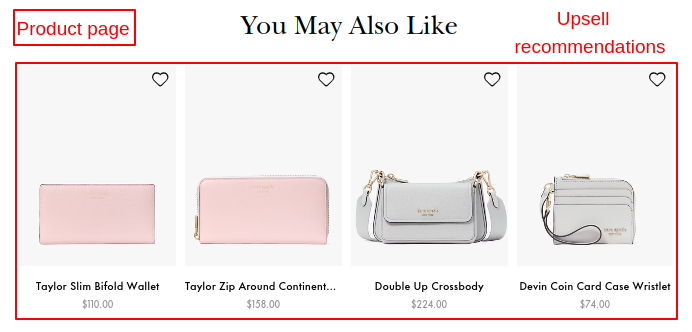
Katespade is a fashion brand that uses upselling to boost its revenue. Here, they have suggested high-priced wallets on the product page of an ordinary wallet.
Brand example for suggesting upsells

Alt=”Brand example for suggesting upsells”

Here’s how it works:

  • These upsell recommendations are presented right below the main product.
  • There are enough choices in recommendations.

How to Set Up Order Bumps in Your Store?

Some of the best practices to set up order bumps are:

  1. Keep it Relevant: Offer small, complementary products that align with the customer’s main purchase.
  2. Focus on Low-Cost Items: Ensure the order bump is inexpensive to drive immediate sales from customers.
  3. Use Clear, Value-driven Messaging: Highlight the benefit or value of the add-on directly on the checkout page.
  4. Leverage Discounts or Bundles: Provide exclusive discounts for the order bump to make it more enticing.
  5. Limit the Options: Stick with one or two order bumps to avoid overwhelming the customer and disturbing their checkout flow.
  6. Place it Strategically: Position the order bump prominently on the checkout page where customers are already making a purchase decision.
  7. Test and Optimize: Use A/B testing to find which order bumps yield maximum results and optimize based on it.
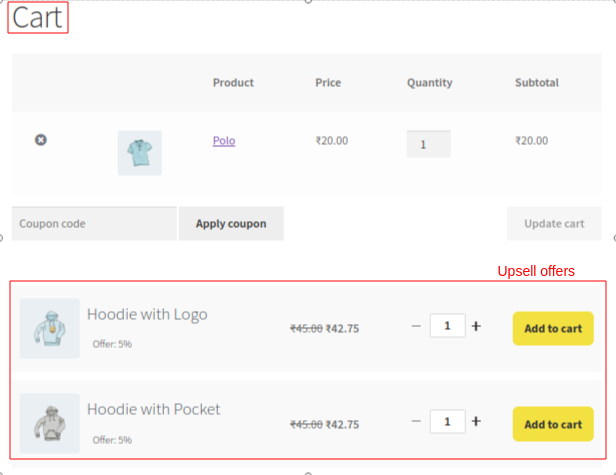
Shopping cart with Polo item and two hoodie upsell offers with 5% discount

In this order bump template, you can see the discount offer and a clear CTA text. Plus, it’s strategically placed above the ‘place order’ button to make customers accept the offer right before completing their purchase.

How to Price an Order Bump

Pricing is where a lot of stores get order bumps wrong, and it is one of the easiest things to fix. The goal is a price low enough to be an impulse “yes,” but high enough to meaningfully add to the order.

A practical guideline from published funnel testing is to price your order bump at roughly 33% to 66% of the primary product’s price. So if a customer is buying a $90 item, an order bump somewhere between $30 and $60 tends to perform well, and you can round to a clean number to sit alongside the main price.

Two more pricing notes worth keeping in mind:

  • Judge on revenue, not just take rate. A slightly higher-priced bump with a lower acceptance rate often produces more total revenue than a cheap one everyone accepts. Watch cart value, not only conversion percentage.
  • Make the discount exclusive. An order bump discount should be one the shopper cannot get in your regular store, so the offer feels like a genuine reason to say yes right now.

How to Implement Upsells in Your Store?

Here are some of the best strategies to implement upsells:
  1. Offer Clear Upgrades: Present a premium version of the product with additional benefits and features.
  2. Highlight Value Over Price: Emphasize the benefits of the upgrade rather than just the cost difference.
  3. Time It Right: Show the upsell offers at strategic moments, such as after the customer adds an item to the cart, during checkout, or post-purchase .
  4. Use Visual Comparisons: Add side-by-side comparisons of the standard and premium versions to make the value difference clear.
  5. Leverage Post-Purchase Upsells: Offer one-click upsells after the first purchase that doesn’t require re-entering payment information again.
  6. Use Popups: Show product suggestions in the time-sensitive upsell popup window.
  7. Test Multiple Offers: Experiment with different upsell options and price points to find what works best with your customers.

In a good upsell offer placed on the cart page, the recommended products sit right below the items already added, the products are offered at a discount, and customers can adjust the quantity of the upsell products. That combination of relevance, a visible saving, and control is what makes an upsell feel like an upgrade rather than a hard sell.

Order Bump Vs Upsell: Which is the Best Strategy?

Order bumps work best as low-cost, complementary add-ons during checkout, while upsells focus on premium alternatives or higher-priced products to increase sales . But both order bumps and upsells have their place in boosting conversion rates and enhancing the shopping experience.

The data backs this up: order bumps give you frequent small wins at a high take rate, and upsells give you fewer but larger wins. Neither replaces the other. The stores that get the most out of both are the ones that assign each offer to the right moment, using the framework above, rather than forcing everything into one place.

Sum Up

Now that you know what order bumps and upsells are, how they perform, and how to set them up, the path forward is simple. Use order bumps for the easy, low-cost add-ons at checkout, use upsells for the higher-value upgrades that need a little room to convince, and let the offer itself decide which bucket it belongs in. Implemented at the right touchpoints, these two strategies drive real revenue and improve the shopping experience at the same time.

To run both from one place, we recommend UpsellWP — a single WooCommerce plugin to create order bumps, upsells, cross-sell products , frequently bought together offers, and more.

The free version covers checkout order bumps and frequently bought together, and PRO adds cart upsells, post-purchase one-click offers, and thank-you-page upsells.

Now read this blog on the difference between WooCommerce and Shopify to know which is the better platform to use.

Related Reading:

Frequently Asked Questions

What is the main difference between an order bump and an upsell?

An order bump is a low-cost add-on shown at checkout before payment, accepted in one click. An upsell is a higher-value offer shown in the cart or after purchase. Bumps add small amounts often; upsells add larger amounts less often.

Do order bumps or upsells convert better?

Order bumps usually convert at a higher rate because they are cheap and need no thought, with take rates often around 20% to 60%. Upsells convert less often, roughly 10% to 20%, but each acceptance adds more revenue.

How should I price an order bump?

A common guideline is to price the order bump at about 33% to 66% of the primary product’s price, low enough to be an impulse buy but high enough to add real value. Judge success by total revenue, not just take rate.

What are the 4 stages of upselling?

The four stages are identifying the upsell opportunity, displaying the upsell offer, highlighting the added value, and converting with a clear call to action.

What is down-sell vs upsell?

A down-sell is a lower-priced alternative offered to retain a customer who declined the main offer, while an upsell is a higher-priced alternative offered to boost average order value.

Are order bumps or upsells better for first-time customers?

Order bumps work better for first-time customers because they are low-cost, relevant, and build trust without overwhelming them, while a big upsell can feel like too much before the customer trusts your store.

Can I offer multiple order bumps or upsells in one transaction?

Yes, but keep it minimal to avoid overwhelming the customer. One or two well-placed offers keep the checkout smooth while still lifting order value.