

Most WooCommerce stores already “recommend” products. They display a Related Products grid, along with a few upsells, and hope customers will add more items. That’s not a recommendation engine.
A real WooCommerce Recommendation Engine is a system that:
This guide is UpsellWP-first. You’ll learn the complete working procedure of UpsellWP’s Product Recommendation Engine feature—how to set up engines, connect them to campaigns, deploy them on product/cart/checkout/thank-you pages, and run it like an experienced store owner who cares about AOV and conversion rate.
Show the right products at high-intent moments on product, cart, or checkout pages using the UpsellWP plugin.
A recommendation engine isn’t “more products on a page.” It’s a decision framework that answers: “What is the next most helpful product for this shopper right now?”
To consistently answer that, your system must cover five non-negotiables:
1) Relevance (complements, not substitutes)
Recommendations should make the order more complete:
Avoid substitutes (“another shoe”) at high-intent moments (cart/checkout) because they trigger doubt.
2) Intent-based timing
The same recommendation converts very differently depending on when it’s shown:
3) Control (rules + limits)
You need guardrails:
4) Reusability (logic once, deploy anywhere)
If you have to manually reconfigure recommendations for every product, your system will collapse as your catalog grows.
5) Measurability (so it compounds)
If you don’t measure attach rate and AOV lift, you can’t improve it, and you’ll end up “guessing” forever.
UpsellWP is designed around these requirements by separating Recommendation Engines (logic) from Campaigns (placement + presentation).
Also Read: Increase Average Order Value: 15 Best Ways
UpsellWP’s approach is simple but powerful:
Think of Engines as your “recommendation brain” and Campaigns as your “display + conversion layer.”
Go to: “WordPress Dashboard” → “UpsellWP” → “Engines” → “Create New Engine.”
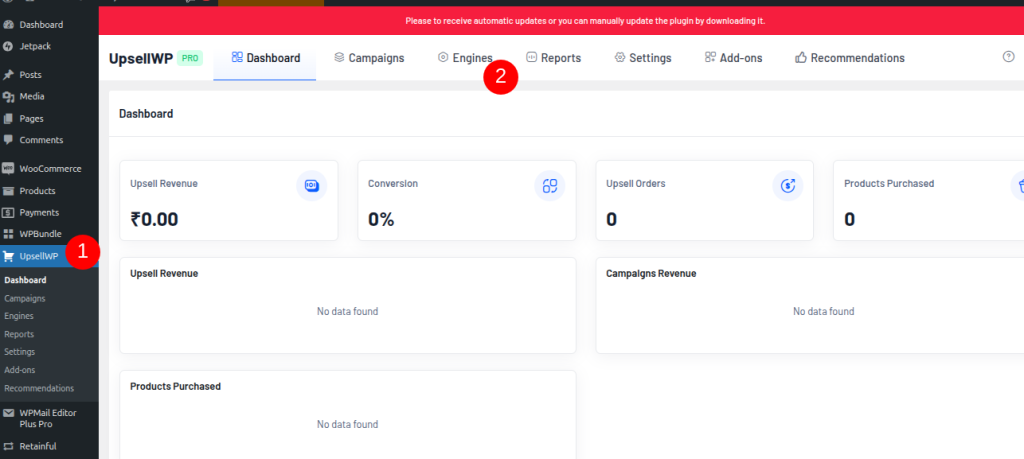
You’ll choose an Engine Type first. UpsellWP uses different engine types because recommendations should use different data depending on where they appear.
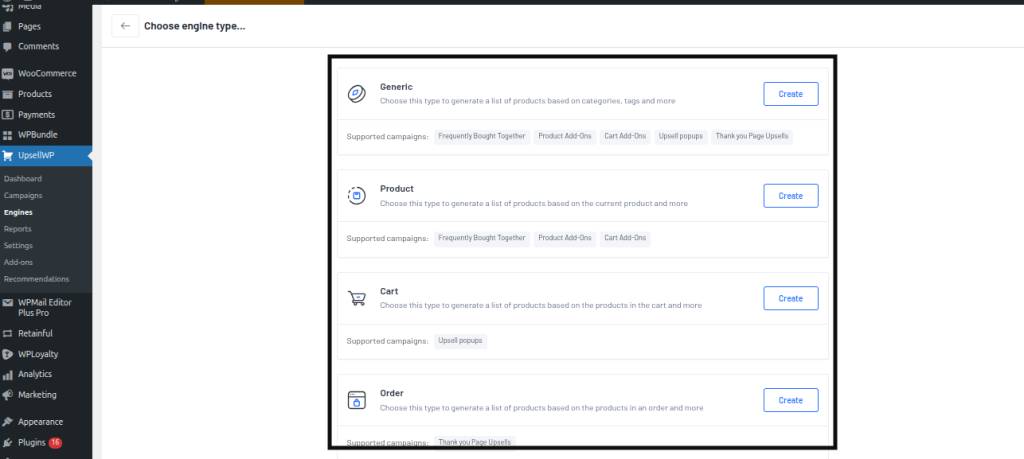
Engine Types (what they’re for)
Also Read: How to Show Related Products in WooCommerce
Add Filters (how UpsellWP chooses items):
After selecting the engine type, you add one or more Filters. Common filters you’ll use for recommendation engines include:
Also Read: How to Display WooCommerce Frequently Bought Together
Once your filters are set, click “Save” or “Save & Close.”
At this point, you have a reusable recommendation engine. Nothing appears on the storefront yet—that happens when you connect it to a campaign.
Now you decide where recommendations show and how they look. Create a campaign from:
“UpsellWP” -> “Create New Campaign”
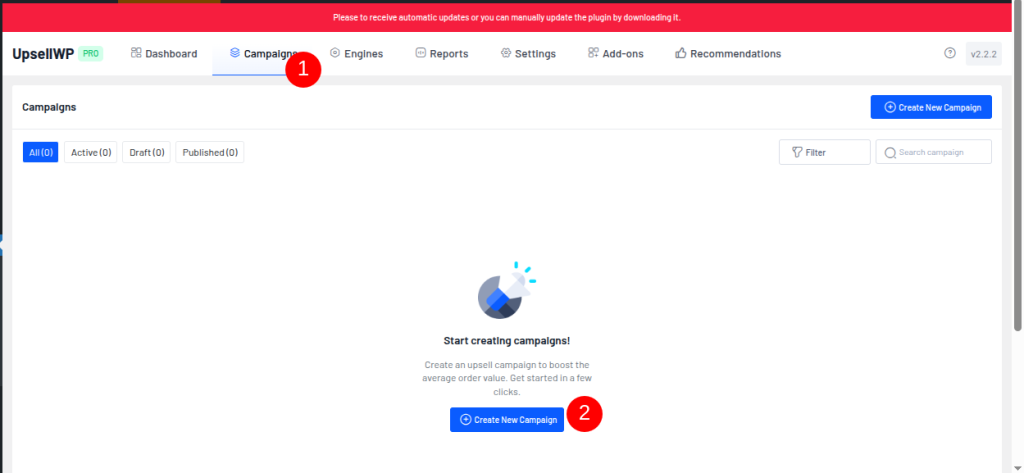
UpsellWP offers multiple campaign types that can use recommendation engines, including:
Also Read: How to Show WooCommerce Product Add-Ons
Inside the campaign setup, you’ll see a setting like:
“Product suggestion method” → “Use Recommendation Engine”
Select your engine, configure display settings, and Save.
This is the most important part of UpsellWP’s system:
After selecting the engine in a campaign, focus on these conversion-critical settings:
If you do nothing else, get Display Limit right. Over-recommending reduces trust and clicks.
Recommended starting points:
Build product recommendation logic once and reuse it across multiple campaigns to reduce time using the UpsellWP plugin.
Below are three UpsellWP recommendation setups that cover the highest-revenue moments in a WooCommerce store.
Each setup follows the same structure:
(Product Engine → Frequently Bought Together campaign)
Use this when:
You want to increase average order value before the shopper reaches checkout, without adding friction.
Result:
You now have a reusable engine that dynamically finds products commonly purchased together with the viewed product.
Set the following:
Click Save & Publish.
(Generic Engine → Cart Add-ons campaign)
Use this when:
You want a low-risk, high-utility upsell right before checkout.
Result:
This engine always pulls your most-purchased products storewide.
Set the following:
Click Save & Publish.
(Order Engine → Thank You Page Upsell campaign)
Use this when:
You want to monetize post-purchase momentum without affecting checkout conversion.
Result:
This engine recommends products related to what the customer just purchased.
Note:
Thank You Page Upsells run exclusively and don’t overlap with other campaigns.
Set the following:
Click Save & Publish.
UpsellWP gives you the system. This is how you run it like an owner who cares about numbers.
1) Decide your goal per placement
Pick one goal per touchpoint:
If you mix goals in the same block, relevance drops.
2) Set hard limits (choice kills conversion)
If you’re tempted to show 8 recommendations, don’t. Show 2–3 and rotate via logic, not volume.
3) Add exclusions that protect UX
Even if you don’t see a toggle for every rule, think like this:
4) Use fallback logic
If the engine can’t find matches, fall back to:
The worst look is an empty “recommendations” block.
5) Keep design boring (boring converts)
Your recommendation UI should look like part of the store:
The moment it looks like an ad, clicks drop.
If you want this to compound, measure three metrics per campaign:
1) Recommendation CTR
Did shoppers click or interact with the recommendations?
2) Attach rate
Of the people who saw recommendations, how many added at least one recommended item?
3) AOV lift
Did the average order value increase versus baseline?
A simple weekly routine:
Quick wins usually come from:
Mistake 1: Treating recommendations like “more products.”
Fix: pick three placements and go deep. UpsellWP makes it easy to reuse engines—use that to keep logic consistent.
Mistake 2: Showing substitutes at checkout
Fix: at checkout, only show complements (warranty, accessory, upgrade). Put “similar items” on product pages instead.
Mistake 3: Too many recommendations
Fix: limit to 2–3. If you need variety, change the engine logic, not the display volume.
Mistake 4: Recommending low-margin products
Fix: create a separate engine for “high-margin add-ons” or exclude low-margin SKUs from recommendation-heavy placements.
Mistake 5: Not using post-purchase momentum
Fix: add an Order Engine + Thank You Upsell campaign. It’s the cleanest upsell moment with the least downside.
Improve product discovery without disrupting checkout or slowing down purchase using the product recommendation engine of UpsellWP.
A WooCommerce Recommendation Engine isn’t a widget. It’s a system.
UpsellWP works because it separates:
That means you can:
If you want the quickest path to results, start here:
That’s a complete, scalable UpsellWP recommendation system—without cluttering your store or sacrificing conversions.
Related Read:
A WooCommerce recommendation engine is a system or plugin that suggests relevant products to shoppers using rules, browsing behavior, or purchase data to increase conversions and average order value.
It analyzes signals like product views, cart contents, and purchase history, then applies rules or algorithms to display relevant product suggestions at key store locations.
High-impact placements include product pages, cart, checkout, and thank-you pages, where user intent is highest, and add-on decisions feel natural.
No. Rule-based engines can work immediately, while behavior-based recommendations improve over time as your store collects more views and orders.
Rule-based recommendations follow predefined filters (e.g., best sellers, related products), while AI recommendations automatically learn from customer behavior and patterns.
Yes. Well-placed recommendations, such as frequently bought together items, cart add-ons, and post-purchase offers, consistently increase the average order value when relevance is high.
This is often caused by caching issues, missing data, incorrect placement settings, or conflicts with themes/plugins that block dynamic content.
Look for flexible placement options, rule-based control, performance optimization, analytics, and the ability to reuse recommendation logic across campaigns.


Like our insights? Click the badge to add UpsellWP as your preferred source on Google.